 Hornil StylePix User Manual
※ Latest version: StylePix , StylePix Pro
Hornil StylePix User Manual Browse Images
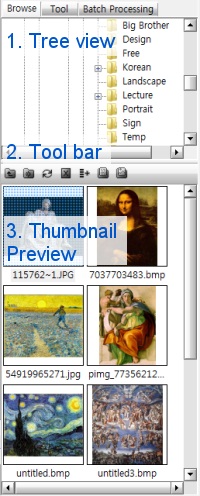
The Browse Images lets you easily explore the images before open an image. Also you can open, copy, delete, and rename the images or directories with Browse Images tool.
icon in the tools panel.The Browse Images is consisted of tree view, tool bar, and thumbnail preview.
 Parent Folder
The Parent Folder command allows you to go to parent folder.
 Create New Folder
The Create New Folder command create new folder in current path.
 Refresh
The Refresh command refreshes the thumbnail preview.
 Delete
The Delete command lets you delete current selected files or directories.
 Add Batch List
The Add Batch List command allows you to add current selected files to batch processing list.
 Go to my document folder
 Go to my picture folder